


From Scan to Crown: A Beginner's Honest Look at Digital Crown and Bridge Design

You don't need to master everything on day one. You need one clear path — and the confidence that nothing is hidden from you along the way.

Why Crown and Bridge Feels Intimidating (And Why That's Okay)
If you have just started exploring digital dentistry, crown and bridge design is often the first mountain you are told to climb — and the first one that makes many people want to turn around. It sits at the intersection of everything: anatomy, occlusion, margins, contacts, materials. Other workflows feel like learning a single tool. Crown and bridge feels like learning an entire language.
Here is the honest truth we tell every beginner in the BlenderforDental (B4D) community: you are not supposed to master this in a week. What you are supposed to do is see the whole path clearly, understand the logic behind each step, and realize that every decision stays in your hands — not buried inside a "one-click magic" button you don't understand.
Because that is the real problem with many digital workflows aimed at beginners. They promise simplicity by hiding complexity. You press a button, something appears, and if it is wrong, you have no idea where to look. That is not simplicity. That is dependency.
B4D takes the opposite approach. The software shows you every step — the margin, the spacer, the contact, the trim against the opposing teeth — so that by the time your crown is finished, you understand why it fits, not just that it fits. That understanding is the skill. And the skill is yours for life.
The Big Idea: Anything Can Be Done in Blender
Before we walk through any workflow, hold onto one principle: BlenderforDental is built on the idea that anything can be done with it. The tooth library, the trimming tools, the spacers, the margin controls — these are not closed procedures handed to you by the software. They are building blocks you can combine, adjust, and extend.
This matters for beginners more than any single feature, because it changes how you think about mistakes. In a locked workflow, a mistake means "the software failed me." In B4D, a mistake means "I now know what this tool does." Every error becomes a lesson instead of a dead end. That single shift in mindset is what carries beginners from their first nervous design to confident, independent work.
One Crown, Step by Step: What the Workflow Actually Looks Like
Let's follow a real workflow — the same one demonstrated in our Lower Crown video — so you can see that a complete crown is a short chain of logical decisions, not a mystery.
Step 1 — Set up your view. You open your scan, switch the model to texture mode so the tooth anatomy reads clearly, and hide the opposing arch for a moment. This isn't a technical trick; it's focus. You remove everything that isn't relevant to the tooth you're working on.
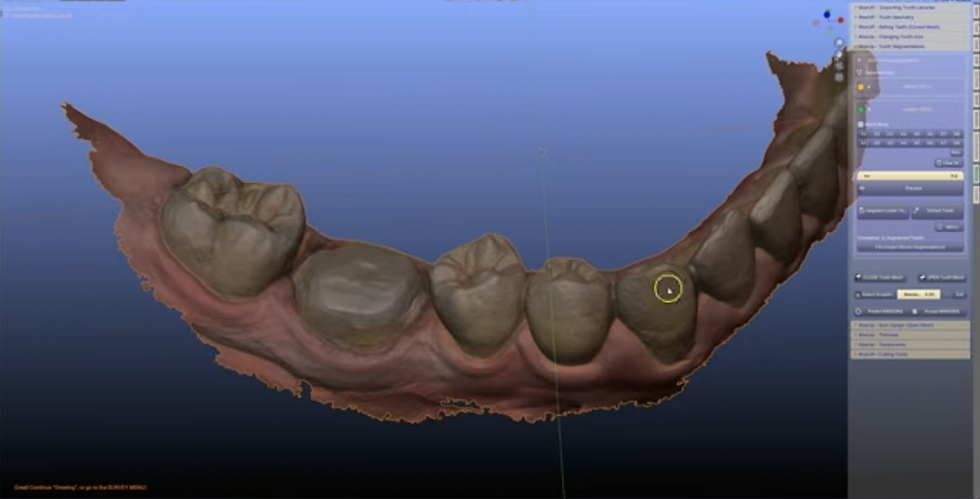
Step 2 — Define the margin. Using the existing margin on the prepared tooth, you draw the lower surface of your restoration. This is the first and most important decision in the entire design: where the crown meets the tooth. You make it, you see it, you own it.

Step 3 — Bring in a tooth. A tooth shape is imported from the library and positioned over the preparation — scaled, rotated, and moved into place. You are not drawing a crown from nothing; you are starting from anatomy and adapting it. This alone removes most of the fear beginners feel.

Step 4 — Make it fit. You paint the contact areas where the crown touches its neighbors, create the surfaces, and perform blockouts so nothing undercuts. Then a supportive edge is added at 0.1 mm, and die spacers and safety zones are applied automatically — small, precise details that protect the crown clinically.

Step 5 — Check the bite while you work. The opposing arch comes back into view and is used as a live cutter. As you adjust your crown, you trim it against the opposing teeth in real time, so the occlusion is correct during design, not discovered afterward.

Step 6 — Finish with intention. The crown is generated, the contacts are shaped precisely, and the margins and emergence profile — the transition from crown to gumline — are smoothed by hand. Finally, the opposing arch is unhidden one last time to verify occlusion, fit, and contacts before the design ever leaves your screen.

Notice something: every step has a reason. Margin first, because fit starts there. Contacts next, because a crown lives between neighbors. Occlusion checked live, because the bite decides whether the crown survives in the mouth. Follow the logic once, and the sequence becomes second nature.
Stage | What Happens | Why It Matters |
Setup | Texture mode on, antagonist hidden | Focus on one tooth at a time |
Margin | Lower surface drawn from the existing margin | Fit starts where the crown meets the tooth |
Anatomy | Library tooth positioned and adapted | Start from real anatomy, not a blank shape |
Fit | Contacts painted, blockouts, 0.1 mm supportive edge, spacers | Precision details that protect the restoration |
Occlusion | Live trimming against the opposing arch | The bite is checked during design, not after |
Refinement | Crown generated, contacts shaped, margins and emergence smoothed | The finish quality comes from your hands |
From Crown to Bridge: The Same Logic, One Step Further
Once a single crown makes sense, a small bridge is just the same thinking applied twice — with one extra idea. Instead of one library tooth, you import several and unify them into a single structure (in the demonstrated workflow, with a 3.5 mm radius smoothing the connections). That unified structure then flows through the same journey: margins, contacts, spacers, live trimming, refinement. You can see this in our One-Unit Bridge video.
Two things in that workflow deserve special mention for beginners, because they point to something bigger about where B4D is heading.

First, the Wax Up Module's new margin prediction feature. You place a few seed points, the software segments the surface, and the margin is extracted for you — dramatically reducing manual editing time. This is automation, yes. But notice what it automates: the repetitive part, not the judgment. You still review, adjust, and approve every margin. That is the difference between assistance and replacement, and it is exactly the kind of AI work B4D invests in — transparent, controllable tools that serve your judgment rather than override it. The same thinking powers B4D's own segmentation tools, including Airways, all built as human-controlled features rather than black-box magic.

Second, the Auto Contact Cutter at the end, which shapes and smooths contact areas automatically — followed, again, by optional hand sculpting for ridge overlapping and thicker contacts. Even the automation comes with an invitation: "the bridge is functionally complete, but you can go further if you want." The door is always open; you decide whether to walk through it.


"Own It": Why There Are No Fees After Day One
There is one more piece of the B4D story that matters to beginners, and it has little to do with tools. It is about ownership.
With subscription-based dental software, every year brings a decision: pay again or lose access to your own files, your own workflow, your own skills. For someone just starting out, that recurring cost creates quiet anxiety — a feeling that you are renting your education rather than owning it.
B4D is different by design: you buy it once, you own it for life. No update fees. No export fees. Nothing between you and the work you produce. When a short showcase like Crown and Bridge in Action moves from scan to finished crown in about a minute of screen time, what you are really watching is freedom — the freedom to take a case from the clinic to the final restoration entirely on your own terms, at your own pace, without a billing cycle watching over your shoulder.
"Own it." — The invitation at the heart of B4D. Own your tools, own your skills, own your cases.
What This Means for You, Starting Today
If you are new to digital design, here is the path this article is pointing toward. Do not try to absorb everything at once. Watch the crown workflow video and pause after every step, asking yourself why that step exists. Then try one crown of your own — not a perfect one, just a complete one. Then a second. Then a small bridge. The speed will come; what matters early is that each attempt adds to your understanding rather than your frustration.
Remember the question we ask of everything we teach: does this make you feel more capable, not more dependent? A workflow that hides its steps makes you dependent. A workflow that explains them makes you capable. B4D was built on the second kind.
Ready to Start Your Own Journey?
The Crown and Bridge Module lives at the heart of the B4D shop, and it was designed for exactly this moment — the moment you decide to stop watching digital dentistry from the outside.
Everything you saw in these videos is inside that module, taught step by step, with no subscription and no expiration. And if you are curious where the learning goes next, B4D's own segmentation tools — including Airways — show how far one buy-once-for-life investment can take you.
Start with one crown. Understand every step. Build the skill, and it stays with you forever.
Connect with the Community
• Instagram: @blenderfordental
• Facebook Group: Blender for Dental Community
• YouTube: Blenderfordental Tutorials
Editor's Credit
This article was edited and curated by Dr. Samira Alrefaey, Blog Editor & Marketing Specialist at BlenderforDental. Through this technical exploration, we continue our mission to empower clinicians and designers with the thinking tools necessary to redefine what is possible in digital dentistry — one case, one breakthrough, one precise measurement at a time.


Hola. Sigo sin entender por qué aún Blender no es capaz de crear una forma de modelar/esculpir mientras se visualiza el mapa de colores de contacto. En la fabricación de férulas de descarga, que tiene un método absolutamente enrevesado y nada efectivo, resulta que no puedes esculpir los puntos de contacto mientras visualizas el mapa de colores. Ya ni que dicir tiene que no es posible para nada visulizar los el recorrido de los movimientos excursivos: lateralidad y protrusión.Un absoluto disparate con los tiempos que corren. Por otro lado me gustaría saber si en algún momento van a cambiar la forma de diseño de Férulas de Descarga para adaptarlo a las necesidades reales que necesitamos. Simplemente se necestita que en…