


model-designer-pc-module/english

MODEL DESIGNER - PC & Mac
Model creator software for designing 3D printed models. Kickstart your journey with Blender Basics 1, 2, and 3 videos. No prior 3D experience required. Prerequisite module for B4D.
Product Details
Tutorial Time: 85 minutes

79

ibar-module/english

B4D iBar™
Perfect for designing an inner bar within an existing hybrid appliance. This module reverse engineers the bar from the outside towards the inside. You can even import your Hybrids from a different software.
Product Details
Tutorial Time: 50 minutes
299
easyedge/english

EASYEDGE™
Ideal for designing milled edges for precise Crown & Bridge work. Effortlessly create reverse-engineered rests and seats. Compatible with crown imports from any software. Available now!
Product Details
Tutorial Time: 25 minutes
249


Available Now!


What’s new
Blender 4.5 LTS
-
Faster, smoother viewport; cleaner shading & edges
-
More reliable modeling (booleans, mesh ops)
-
Quicker imports for larger files, better denoise/compositing
-
Crisper Grease Pencil lines, small UI polish
-
LTS stability with ongoing fixes
B4D Suite
-
Guide Designer: built-in B4D AI CBCT segmentation; BSB bridge link updated for 4.5; richer DICOM planning (swap/move implants, parallel assemblies, snap abutments, image editor + slice snapping, 5th layer, smaller lock). Slice section view within Blender
-
Model Designer: new feature for construction file exports (HyperDent) + parts-list PDF export; plane cutting tool (multi-object, duplicable); Study Models folder; clearer line drawing; distance map feature.
-
Block Out: screen locks during surveying.
-
Articulator: delete controls + post-cut smoothing.
-
Components: snap target highlights by colour.
-
Crown & Bridge: many script improvements; margin-type dropdown (crowns & abutments); new fast bridge workflow (unify teeth or whole arch); survey lock scene.
-
iBar: naming bug fixed; cleaner, bounded Safety Zone.
-
All modules: updated scripting for faster processing. New scripts are not cmpatible with older Blender versions.
-
Extras: 10 Blender themes
What's New?
DACOS™ Omni
Universal magnetic model system!
Only model, new interface.

The DACOS® Omni, invented by Antonello Croce, introduces a revolutionary magnet-based articulation system for digital dentistry.
It allows you to design and print magnetic models with precision, speed, and simplicity.
Features include:
-
Dynamic Library with automated Boolean workflow.
-
Create models with built-in DACOS® magnetic sockets in a few clicks.
-
Select among 3, 4, 5 or more magnet configurations and offset options (Tight / Standard / Loose).
-
Compatible with all major articulators – Artex, ASA, and more with universal option.
-
Maintains the exact model dimensions. No additional bulk or geometry changes.
-
Designed for seamless use inside the “Only Model” environment of B4D.
Please note, this module does not include the articulation base plate. These must be purchased separately through Metadac eDacShop.com commerce.
Please note that this module does not include the base plate and articulation system.
These must be purchased through eDacShop.com.


The MODEL DESIGNER module is a prerequisite for this module.
EASYEDGES™
A powerful design software for creating precise milling edges in Crown & Bridge work. This module leverages a reverse-engineered approach to generate accurate rests and seats, ensuring optimal fit and functionality. It also supports seamless crown & bridge imports from any other dental software, providing flexibility and efficiency in your workflow.
Available Now!
Feature Highlights
-
Effortlessly design milled rests and seats for Crown & Bridge work.
-
Seamless workflow with the B4D C&B module and EASYEDGES™.
-
Import crowns and bridges from any dental software to design EASYEDGES™.
-
Reverse-engineered approach for precise milled rests.
-
Built-in safeguards to maintain minimum thickness.
-
Supports parallel milled rests and slots, even in pontics.
-
Create orientation positions to align with existing precision attachments.
-
Includes a bevel feature around milled rest seats.
-
Designed exclusively for parallel-sided rests—no angled sides.

The MODEL DESIGNER module is a prerequisite for this module.
249


B4D iBar™
A powerful design software for creating inner bars inside already complete implant hybrid prosthesis.

Feature Highlights
-
Novel Reverse Engineered bar design
-
Hybrid can be imported from other software like Exocad & 3Shape
-
Thickness control ie. automatically adds in thin areas
-
Split or numerous individual bar designs
-
Preserves and re-engineers screw chambers
-
Adjustable cement spacer
-
All tutorials are include
-
Prerequisite is the Model Designer module
New! iBar Bridges™
-
Design iBars on tooth preparations
-
Variable cement spacers
-
Survey and preliminary nesting before export
-
New colours
-
English videos, others coming soon.
Available Now!
299
The MODEL DESIGNER module is a prerequisite for this module. The BlockOut module is highly recommended for blocking out undercuts.
Splint & Layer Module
Available Now! Includes RPD Design & Mesh Grids
Feature Highlights
-
Adjustable layer thickness.
-
Design your splints using either the 'draw method' or a 'paint-on' method.
-
Adjustable bite planes suitable for single arch or dual arch appliances.
-
Create static occlusal adjustments or dynamic occlusal adjustments based on Blender's animation timeline (Requires the Articulator & Virtual Facebow module).
-
Adjustable retention for the splint or various layers (Requires the BlockOut module).
-
Capability of RPD Frame design (with update).
-
Capability to Mesh Grids design.
-
Other design examples - Snore Guards, Mouthguards, Gingivectomy Guides, Bone Levelling Guides, Sub-Periosteal Frames, Twin-Block Appliances, etc.

The Splint & Layer module is capable of designing a wide variety of occlusal splints, as well as RPD Frames and Mesh Grids, with the upcoming update.
249

The MODEL DESIGNER module is a prerequisite for this module. You'll also need the BlockOut module and the Articulator module. To be released with Blender 3.6LTS, and only with new User Interface.


Get started with digital dentistry today!
Our revolutionary plugin for Blender makes this possible.
Learn by watching the easy to follow tutorials and you’ll be up & running in no time at all.
Whether you’re designing printable 3D models, custom trays, or implant guides, we offer the innovative solution.
No licence fees, No annual charges, install on 3 stand-alone computers.
Module prices are in American Dollars - $, USD

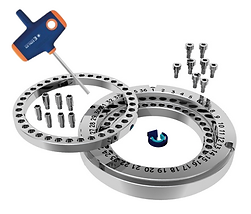


Milling Clamp Software for refining laser printed surfaces
Blenderfordental® is a series of add-ons for the Blender software program to enable it to be used for dentistry. Each module comes with the required easy to follow video tutorials which will guide you through the full functions of the module. The Model Designer is a prerequisite for all other modules. We suggest you have a working knowledge of the Model Designer first. Blender requires some minimum hardware requirements, these can be found on the Blenderfordental website. All module updates are free. We recommend keeping your module up to date, to enjoy all the best features. Only purchase the modules you need - from model making, tray design, implant guides, to crown & bridge work.

Testimonials
